section 2: meta ads manager customization\n6. what is the first step in meta ads manager to launch a…
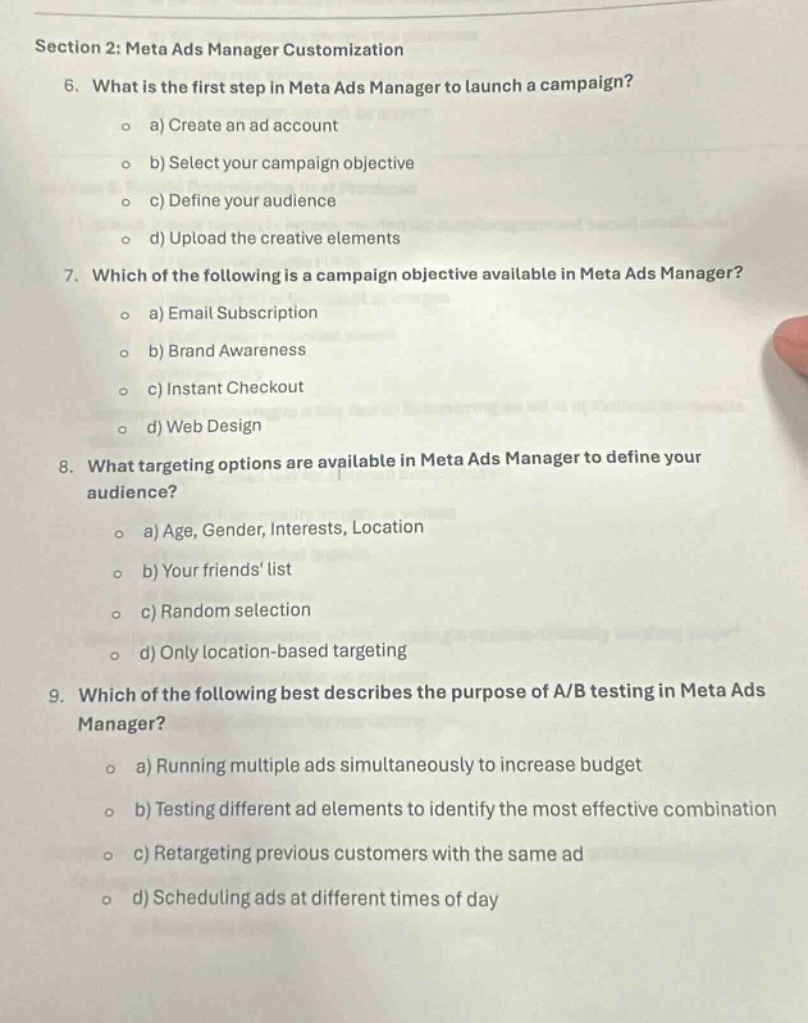
section 2: meta ads manager customization\n6. what is the first step in meta ads manager to launch a campaign?\n o a) create an ad account\n o b) select your campaign objective\n o c) define your audience\n o d) upload the creative elements\n7. which of the following is a campaign objective available in meta ads manager?\n o a) email subscription\n o b) brand awareness\n o c) instant checkout\n o d) web design\n8. what targeting options are available in meta ads manager to define your audience?\n o a) age, gender, interests, location\n o b) your friends list\n o c) random selection\n o d) only location - based targeting\n9. which of the following best describes the purpose of a/b testing in meta ads manager?\n o a) running multiple ads simultaneously to increase budget\n o b) testing different ad elements to identify the most effective combination\n o c) retargeting previous customers with the same ad\n o d) scheduling ads at different times of day
Answer
Brief Explanations:
- In Meta Ads Manager, before setting objectives, defining audience or uploading creatives, an ad account must first be created.
- Brand Awareness is a common campaign - objective in Meta Ads Manager. Email Subscription, Instant Checkout and Web Design are not typical campaign objectives there.
- Age, Gender, Interests, Location are common targeting options in Meta Ads Manager to define an audience. Friends' list, random selection and only location - based targeting are not the comprehensive or main ways.
- A/B testing in Meta Ads Manager is about testing different ad elements to find the most effective combination. It's not about increasing budget, retargeting with the same ad or scheduling ads at different times.
Answer:
- a) Create an ad account
- b) Brand Awareness
- a) Age, Gender, Interests, Location
- b) Testing different ad elements to identify the most effective combination